 SolveCube
How to solve a Megaminx by scanning it
A Megaminx has 12 faces, 12 colors and 50 moving pieces, which is why most beginner methods run to pages of algorithms. If you just want a scrambled one back to solved, you can let your iPhone read it and show you every turn.
Get SolveCube on the App Store
Before you start
- Find even, bright light. Avoid strong shadows or a lamp shining directly on the stickers; turn on the flashlight from the scan screen if the room is dim.
- The scanner expects black gaps between stickers. On a stickerless or unusually colored Megaminx, skip the camera and use Fill colors instead.
- Megaminx is part of SolveCube Pro. The 2×2 and 3×3 have free solves if you want to try the app first.
Step by step
Choose Megaminx and tap scan
On the home screen, tap the puzzle name at the top, pick Megaminx, then tap the yellow camera button.
Hold up each face the model asks for
A small Megaminx in the corner turns to show which face to point at the camera next. Hold that face flat-on, with its center facing the lens. Colored dots track the stickers as you move; keep still for a moment and the face is captured automatically, then the model moves on.
The grid of 12 tiles fills in as faces are captured. Tap any tile to jump back and rescan that face, or tap the reset arrow to start over.
Check the colors on the 3D model
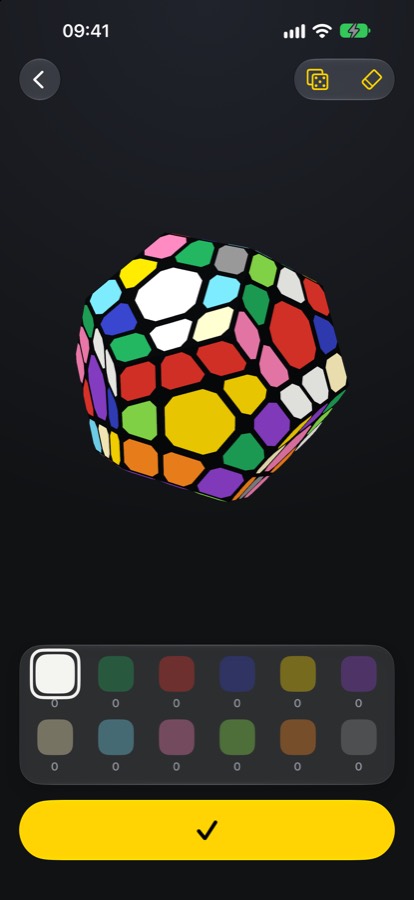
After the last face, the scan opens on a 3D Megaminx. Drag to turn it and compare with the real puzzle. Pick a color from the palette and tap a sticker to fix it. The counter under each color helps: on a valid Megaminx every color appears exactly 11 times.
Follow the solution
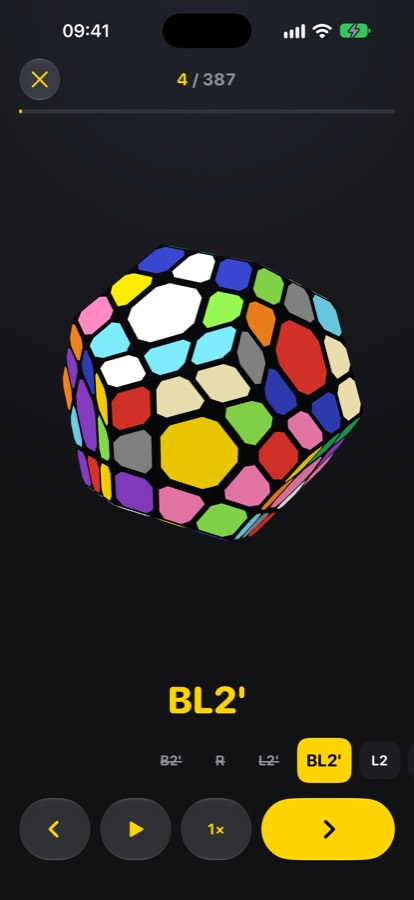
Tap the check mark to solve. The app shows one move at a time, with the face to turn and its direction animated on the model. Go forward, step back, change speed or press play. A Megaminx solution is long, often a few hundred moves, but you only ever need to do the move on screen. Leave mid-solve and your place is saved in History.
Tips for a clean Megaminx scan
Keep the face square to the camera
Faces seen at a steep angle are ignored, so tilt the puzzle until the face you're scanning points straight at the lens.
Watch similar colors
Megaminx color schemes include close pairs like light and dark green, yellow and beige, or pink and red. Under warm light these are the most common misreads; fix them on the 3D check screen rather than rescanning everything.
Follow the model to the next face
Turn the puzzle the same way the small model turns. Holding up a different face than the one asked for is a common cause of a scan that won't solve.
Other puzzles
The same scan-and-follow approach works for the 2×2, 3×3, 4×4, 5×5, Pyraminx, Skewb and Square-1. See all features.